

The Manufacturing Dilemma: MTO vs. MTS
Manufacturers constantly wrestle with a fundamental decision that impacts everything from their bottom line to customer satisfaction: should they build products only after a customer cuts a purchase order (Make-to-Order), or should they produce ahead of time based on market forecasts (Make-to-Stock)?
Modern platforms like Zoho ERP eliminate the need to choose just one approach. Instead, they allow businesses to run both strategies side-by-side within a single system. Navigating Make-to-Order (MTO) and Make-to-Stock (MTS) inside Zoho is the key to balancing production capacity with inventory costs.
Mastering Make-to-Order (MTO) in Zoho ERP
The Make-to-Order strategy triggers production only when a confirmed sales order hits the system. In Zoho ERP, this creates a direct link between the sales desk and the shop floor, ensuring you only burn resources for guaranteed revenue.
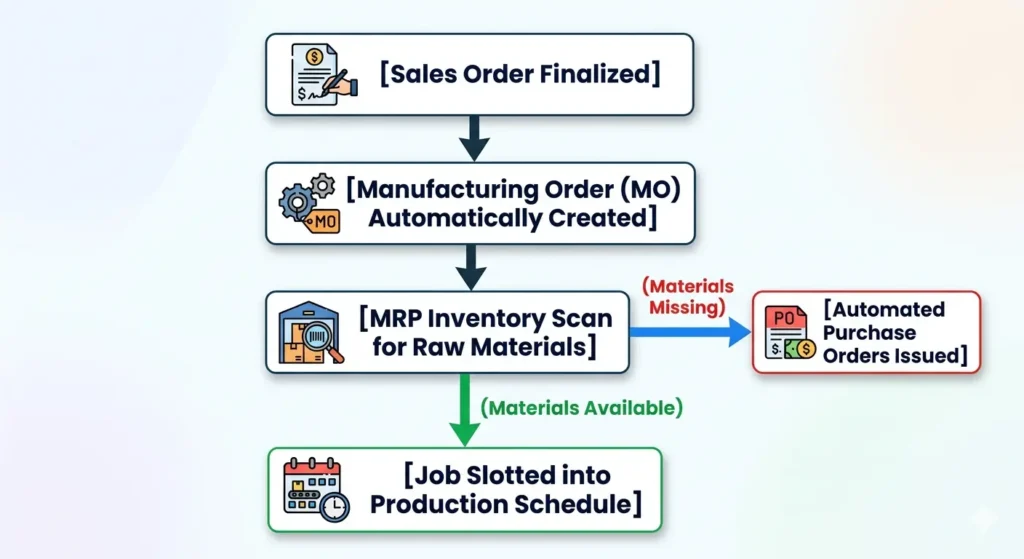
How the Zoho MTO Workflow Runs:
- Instant Trigger: A new sales order automatically generates a corresponding Manufacturing Order (MO).
- The Component Check: The Material Requirements Planning (MRP) module scans current inventory for the necessary raw materials.
- Smart Procurement: If anything is missing, the system automatically drafts purchase orders for the required components.
- Scheduling: Production is slotted into the schedule based on real-time machine capacity and labor availability.
The Upside: You drastically cut inventory carrying costs, offer clients deep product customization, and virtually eliminate dead stock. Plus, cash isn’t tied up in unsold warehouse goods.
The Hurdle: Lead times are naturally longer, you are highly dependent on supplier speed, and a sudden influx of orders can easily bottleneck the shop floor.
Zoho ERP solves these pain points by offering live visibility into your supply chain and work centers. You can see exact lead times and current floor capacity before promising a delivery date to a customer.
Leveraging Make-to-Stock (MTS) in Zoho ERP
Make-to-Stock flips the script. Here, you produce goods in advance based on historical demand forecasts, keeping the finished product on shelves so it’s ready to ship the moment a customer buys.
In Zoho ERP, the MTS workflow relies heavily on demand forecasting and automated replenishment logic to keep the warehouse balanced.
How the Zoho MTS Workflow Runs:
- Forecasting: The system analyzes past sales trends to predict future demand and build a production blueprint.
- Batch Planning: MRP calculates the bulk materials needed for the run.
- Stocking Up: Production runs smoothly in large batches, and finished goods sit in the warehouse until a sales order triggers immediate fulfillment.
The Upside: Shipping is lightning-fast because the inventory already exists. It also allows for predictable, steady production schedules and better economies of scale on raw materials.
The Hurdle: You risk holding expensive inventory that might become obsolete, and your success depends heavily on forecast accuracy.
To minimize these risks, Zoho ERP uses real-time dashboards and automated reorder points. When stock dips below a safe threshold, the system flags it, preventing both stockouts and overproduction.
MTO vs. MTS: A Quick Comparison
| Factor | Make-to-Order (MTO) | Make-to-Stock (MTS) |
| What starts production? | A confirmed customer order | Historical sales forecasts |
| Warehouse footprint | Low finished stock; higher raw parts | High volume of finished goods |
| Customer wait time | Longer (built from scratch) | Instant (shipped from stock) |
| Customization | Highly flexible | Strict, standardized items |
| Biggest operational risk | Supply chain bottlenecks | Overstocking and dead capital |
Blending Strategies: The Hybrid Approach
Most manufacturers don’t fit neatly into a single box. They use a hybrid model—relying on MTS for predictable, fast-moving items, and switching to MTO for specialized or high-value configurations.
Zoho ERP handles this mixed-mode manufacturing through:
- Dynamic product routing rules
- Automated, multi-layered MRP planning
- On-demand production triggers for custom configurations
- Min/Max stock thresholds for baseline inventory
A practical example: A tech manufacturer might use MTS to mass-produce standard internal circuit boards to keep on the shelf, but use MTO for the final assembly based on the specific casing and ports a customer selects.
Data-Driven Shop Floors
The real value of managing this in Zoho ERP is the data it generates. Instead of guessing which strategy fits which product, managers can look at hard numbers to answer critical questions:
- Which SKUs have stable enough demand to justify building to stock?
- Which products are too volatile and should shift to an on-demand model?
- What is the exact sweet spot for safety stock to avoid tying up cash flow?
This shifts your operations from reactive firefighting to proactive, data-driven optimization.
Summary
Choosing between Make-to-Order and Make-to-Stock isn’t a binary decision—it’s a balancing act. While MTO protects your cash flow and offers flexibility, MTS gives you the speed needed to win fast-moving markets.
By utilizing Zoho ERP to anchor both strategies under one roof, you can leverage automated workflows and real-time data to cut operational costs, protect margins, and consistently hit delivery targets.