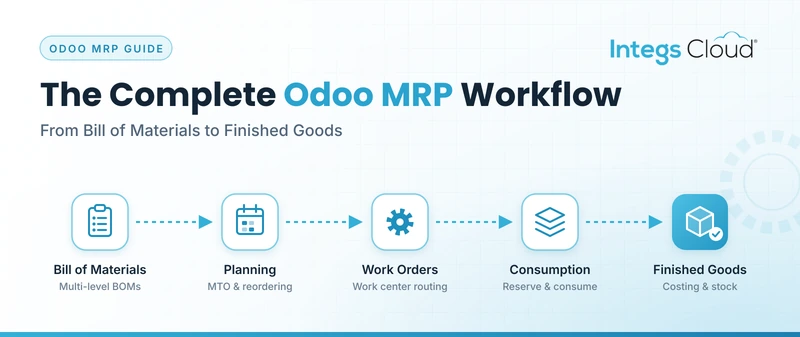
Most manufacturers who adopt the Odoo MRP workflow expect the software to fix their production problems. What they find is that Odoo mirrors the quality of the data and decisions put into it. A manufacturing order is only as reliable as the bill of materials behind it, the work center times beneath it, and the stock records feeding it. Understanding how the full workflow connects, from the first BOM line to a finished product sitting in stock, is what separates a clean implementation from one that produces confusing numbers six months after go-live.
This guide walks through the Odoo manufacturing workflow in the order it actually runs, using a practical example: a company that builds steel storage cabinets, with a welded body sub-assembly, shelves, a lock set, fasteners, and powder coating.
Step One: Setting Up Products and the Odoo Bill of Materials (BOM)
Every production run in Odoo starts with the Odoo Bill of Materials (BOM). The BOM defines what goes into one unit, or a stated batch quantity, of a product. For the cabinet, the BOM might list one welded body, four shelves, one lock set, twelve fasteners, and 0.8 kg of powder coating.
Odoo offers two BOM types that matter in practice. A “Manufacture this product” BOM creates a manufacturing order and consumes components to produce a new stock item. A “Kit” BOM does not manufacture anything. It simply explodes into its components when the product is sold or delivered, which suits bundles that are never stocked as a finished item.
A few BOM design decisions have a long reach:
- Use multi-level structures. The welded body should have its own BOM, not be a flat list of sheet metal and weld wire inside the cabinet BOM. Multi-level BOMs let Odoo plan, cost, and track the sub-assembly separately.
- Set the correct quantity basis. A BOM can be defined for a batch, such as 100 shelves, which keeps component ratios realistic for processes like painting or mixing where producing one unit at a time makes no sense.
- Add by-products where they exist. Sawdust, offcuts, or recoverable scrap can be recorded as by-products so they enter stock and carry a share of cost.
- Handle variants deliberately. If the cabinet comes in three colours, product variants with variant-specific BOM lines avoid maintaining three near-identical BOMs.
The BOM also carries the operations: cutting, welding, painting, and assembly, each assigned to a work center with an expected duration. This is where the BOM stops being a parts list and becomes a routing, and it is the link to Odoo Work Orders later in the process.
Step Two: Production Planning and Demand Signals
A manufacturing order can be created by hand, but a well-run Odoo MRP setup lets demand create them. There are three common triggers.
- Make to order. A sales order for a product with the Replenish on Order (MTO) route creates a manufacturing order tied to that specific customer demand.
- Make to stock. A reordering rule with minimum and maximum quantities creates a manufacturing order when forecasted stock falls below the minimum, which suits fast-moving stocked items.
- Manual creation. Planners can create orders directly for planned campaigns or trial runs.
When the manufacturing order is confirmed, Odoo works through the multi-level BOM. If the welded body is set to Manufacture and Replenish on Order, it generates its own order, and components without enough stock generate purchase requests through the replenishment route. The scheduler uses manufacturing lead time, vendor lead time, and security lead time to set dates, which is why unrealistic lead times quietly cause late orders even when the plan looks fine on screen.
Component availability is checked at this stage too. Orders show whether components are available, partially available, or waiting. A planner who works from this status avoids releasing jobs to the shop floor that cannot actually start.
Step Three: Manufacturing Orders and Odoo Work Orders
Once confirmed, the manufacturing order generates one work order per BOM operation. For the cabinet body that could be laser cutting, bending, welding, and finishing, each on a defined work center.
Work centers carry capacity, working hours, efficiency, and cost per hour. When orders are planned, Odoo schedules work orders against available capacity, and the planning view shows which work centers are overloaded. If the welding cell is booked solid for a week, the plan shows it, instead of someone finding out when a supervisor complains.
On the shop floor, operators use the work order tablet view to start, pause, and finish operations. Time is tracked against each operation, so actual duration can be compared with the expected duration in the BOM. Instructions, drawings, and quality control points, such as a measurement check after bending, can be attached to the operation. Dependencies can be set so painting cannot start until welding is marked complete.
This data is what makes later improvement possible. If the finishing operation is consistently taking 40 percent longer than the BOM says, the standard is wrong, and every future schedule built on it will be wrong too.
Step Four: Raw Material Consumption
By default, Odoo reserves components when the manufacturing order is confirmed, which commits stock so it cannot be promised to another job. Reservation is not consumption. Consumption happens when work progresses or when the order is completed, depending on how the operation is configured.
The picking route matters here. Warehouses can use one-step manufacturing, where components are consumed directly from stock, or multi-step flows. In two-step manufacturing, components are first picked to a production location. Three-step adds a final move that stores finished goods back into stock. The more steps, the better the control, and the more transactions the team has to process. Match the route to the real size and discipline of the warehouse.
Consumption settings on the BOM also matter. A Blocked setting prevents the order from being completed if consumption differs from the BOM. An Allowed setting lets operators consume more or less and records the variance, while Allowed with warning does the same but flags the difference first. For processes with natural loss, such as cutting sheet metal or mixing liquids, flexible consumption paired with scrap recording gives a truthful picture of material use. Components tracked by lot or serial number carry that traceability into the finished product, which is essential for recall readiness in regulated sectors.
Step Five: Finished Goods and Costing
When the final operation is done, the operator records the produced quantity and closes the order. Finished cabinets move into stock, by-products are received, and component consumption is posted. If only 80 of 100 units were completed, a backorder can be created for the remainder, so the open balance remains visible instead of disappearing.
Costing follows the physical flow. The value of the finished item is built from component costs plus work center costs, based on tracked operation time and hourly rates. Where automated inventory valuation is enabled, these movements post to accounting without manual journals. If a completed order was recorded incorrectly, an unbuild order can reverse it and return components to stock, which is far better than adjusting inventory manually and losing the audit trail.
Where Odoo MRP Implementations Go Wrong
- Inaccurate BOMs. BOMs copied from engineering drawings that do not reflect what the shop floor actually consumes lead to constant manual overrides.
- Unrealistic operation times. Work center times based on guesses produce schedules nobody trusts. Time a sample of real jobs before go-live.
- Poor inventory accuracy. If the physical stock count is wrong, availability checks and reservations are wrong too. Opening stock and cycle counting need attention before production starts.
- Skipping work orders. Teams that close orders without using work orders lose time tracking, costing detail, and capacity planning.
- Missing lead times. Without lead times on products and vendors, the scheduler cannot plan realistically.
A Practical Starting Point
Begin with one product family, build clean multi-level BOMs, time real operations, and run the complete flow from sales order to finished goods in a test database before touching live data. Add quality checks, barcode-based component picking, and advanced planning once the base flow produces numbers the team trusts.
Integs Cloud implements Odoo MRP for manufacturers, from BOM and routing design to work center configuration, data migration, and shop-floor training, so the workflow described here runs the way your plant actually operates.