Managing employee expenses becomes more challenging as a company grows. Finance teams often find themselves working between two systems: one for submitting expenses and another for financial management.
While Zoho Expense simplifies expense submission and approvals, Oracle NetSuite serves as the financial backbone for accounting and ERP processes. When these systems operate independently, organizations may experience duplicate data entry, inconsistent records, delayed reimbursements, and additional reconciliation work.
The Celigo Integration App helps address these challenges by connecting Zoho Expense and NetSuite through two standard workflows. It provides a straightforward way to automate employee, expense category, and approved expense report synchronization, reducing manual effort while helping maintain consistent financial data.
Why ERP-Level Expense Automation Matters
Expense management affects more than reimbursements—it also supports financial reporting, compliance, and budgeting.
Without integration, organizations often encounter:
Fragmented Records
Differences in employee records or expense categories across systems can lead to reconciliation work and reporting inconsistencies.
Administrative Overhead
Finance teams spend valuable time entering the same information into multiple applications instead of focusing on higher-value work.
Delayed Financial Visibility
When approved expenses are not synchronized promptly, reporting and budgeting may rely on outdated information.
Connecting Zoho Expense and NetSuite helps create a more consistent flow of expense data across both systems.
Core Workflows of the Zoho Expense and NetSuite Integration via Celigo
The Celigo Integration App includes two standard workflows:
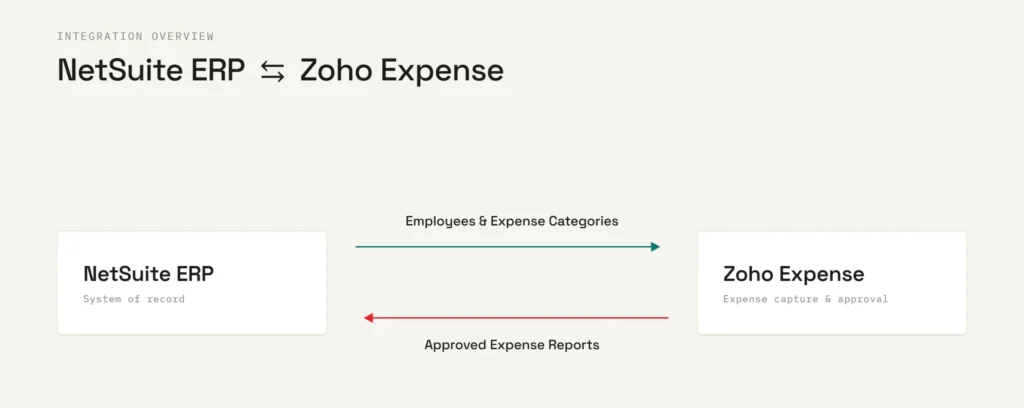
1. Employee and Expense Category Synchronization
This workflow synchronizes employee records and expense categories from NetSuite into Zoho Expense.
The template:
- Synchronizes active employee records from NetSuite.
- Creates employee profiles in Zoho Expense when needed.
- Synchronizes expense categories so both systems remain aligned.
- Helps ensure employees select valid accounting categories during expense submission.
2. Expense Report Synchronization
Once an expense report is approved in Zoho Expense, the template synchronizes it into NetSuite.
The workflow:
- Retrieves approved expense reports.
- Creates corresponding expense transactions in NetSuite.
- Uses unique identifiers to help prevent duplicate synchronization.
- Maintains consistency between expense submissions and financial records.
Benefits
Using this template can help organizations:
- Reduce duplicate data entry.
- Keep employee and expense category information aligned.
- Synchronize approved expense reports automatically.
- Improve visibility into expense reporting.
Built on Celigo
This integration is built on Celigo integrator.io, providing a reliable platform for connecting Zoho Expense and NetSuite.
This is a basic integration template focused on the two standard workflows described above. Organizations can download the template and customize it further by modifying mappings, business rules, and settings to support additional integration requirements as needed.
Before implementation, it is recommended to review API permissions, employee mappings, expense category structures, subsidiaries, and testing environments.
Final Thoughts
Connecting Zoho Expense with NetSuite helps reduce manual effort while improving consistency between expense management and ERP processes.
The Celigo template provides a practical starting point for automating employee synchronization, expense category synchronization, and approved expense report synchronization. As business needs evolve, the template can be extended and customized to support additional workflows.
Need Help Connecting Zoho Expense and NetSuite?
Every organization manages expenses a little differently, and some implementations require additional configuration beyond the standard template.
Integs Cloud helps organizations deploy and customize Celigo integrations based on their business processes. Whether you are implementing the template as provided or extending it to meet additional requirements, our team can help tailor the integration to your environment.